




The Critical Role of Signage in Educational Institutions
Education signage is critical in schools, universities, and institutional campuses, which are complex, large-scale environments that serve thousands of students, faculty, staff, and visitors every day. In these dynamic settings, it plays a vital role in guiding people through the campus, identifying buildings and rooms, communicating important information, ensuring safety and accessibility, and reinforcing the institution’s brand identity and culture. A well-designed, comprehensive campus signage system reduces confusion, improves efficiency, enhances the visitor experience, supports emergency response, and creates a cohesive, professional environment that reflects the institution’s values and mission.
Education signage is unique in its scope and complexity—campuses may include dozens of buildings, hundreds of rooms, miles of pathways and roads, and a diverse population of users (students of all ages, faculty, staff, parents, visitors, delivery personnel, emergency responders). The signage system must address the needs of all these users, from a prospective student visiting campus for the first time to a faculty member navigating a new building, from a parent attending a school event to an emergency responder arriving at an incident. Effective campus signage requires careful planning, consistent design, durable materials, and compliance with a wide range of regulations (ADA accessibility, building codes, fire safety, local sign codes).
This guide provides a comprehensive overview of education signage for schools, universities, and institutional campuses, covering all major sign types and applications, design best practices, material and durability considerations, regulatory compliance requirements, and how to create a cohesive, effective campus sign system. Whether you are planning signage for a new school building, upgrading wayfinding across a university campus, or managing signage for an institutional facility, this guide will help you understand what is needed and how to create a signage system that serves your campus community effectively.
Exterior Campus Signage: Identification and Wayfinding
Exterior campus signage is the first point of contact for visitors and the primary wayfinding tool for navigating the campus. Exterior signage includes several types, each serving a specific purpose in guiding people through the campus environment.
Campus Entrance and Identification Signs
The campus entrance sign (also called a monument sign, gateway sign, or welcome sign) is the primary identification element for the campus, typically positioned at the main entrance(s) and displaying the institution’s name, logo, and (for universities) the campus name. Campus entrance signs set the tone for the entire campus, conveying the institution’s identity, values, and level of quality. They may be simple, elegant monument signs (for traditional or historic campuses) or modern, sleek structures with integrated digital displays (for contemporary or technology-focused institutions). Many institutions choose a custom outdoor freestanding illuminated sign for a bold, contemporary campus entrance that stays visible after dark.
Key design considerations:
- Reflect institutional identity: The entrance sign should reflect the institution’s brand identity, mission, and campus character. A historic Ivy League university might use a classic stone monument sign with elegant serif lettering; a modern technology institute might use a sleek, contemporary sign with stainless steel, glass, and integrated digital displays; a K-12 school might use a colorful, welcoming sign with the school mascot and name.
- Size and visibility: The entrance sign should be sized appropriately for the campus scale and entrance location, large enough to be visible from the road but not so large that it overwhelms the entrance or violates local sign codes. For campuses on major roads, a taller monument or pylon sign may be needed for visibility from traffic; for campuses in residential areas or with setback entrances, a lower monument sign may be more appropriate.
- Materials and durability: Campus entrance signs are long-term investments (expected to last 20–30+ years) and should be constructed from durable, weather-resistant materials such as natural stone (granite, limestone), brick, precast concrete, stainless steel, aluminum (with powder coating), or a combination of materials. Choose materials that complement the campus architecture and can withstand the local climate (UV exposure, rain, snow, temperature extremes, coastal salt air).
- Illumination: Most campus entrance signs are illuminated for nighttime visibility, using either internal LED illumination (for sign cabinets or channel letters) or external landscape lighting (spotlights or uplights directed at the monument sign). Ensure illumination is uniform, energy-efficient, and compliant with local lighting regulations (brightness limits, light pollution, hours of operation). For historic campuses, subtle, warm illumination that highlights the sign without being obtrusive is often preferred.
- Digital display integration: Many modern campus entrance signs include an integrated digital LED display (electronic message center) for announcing campus events, closures, important dates, and welcome messages. Digital displays allow real-time content updates and can significantly increase the sign’s communication value. Choose a display with appropriate resolution (pixel pitch) for the viewing distance, and ensure it complies with local regulations on brightness, animation, and content. Our guide to 2026 LED signage trends provides additional information on digital LED displays.

Campus Wayfinding and Directional Signs
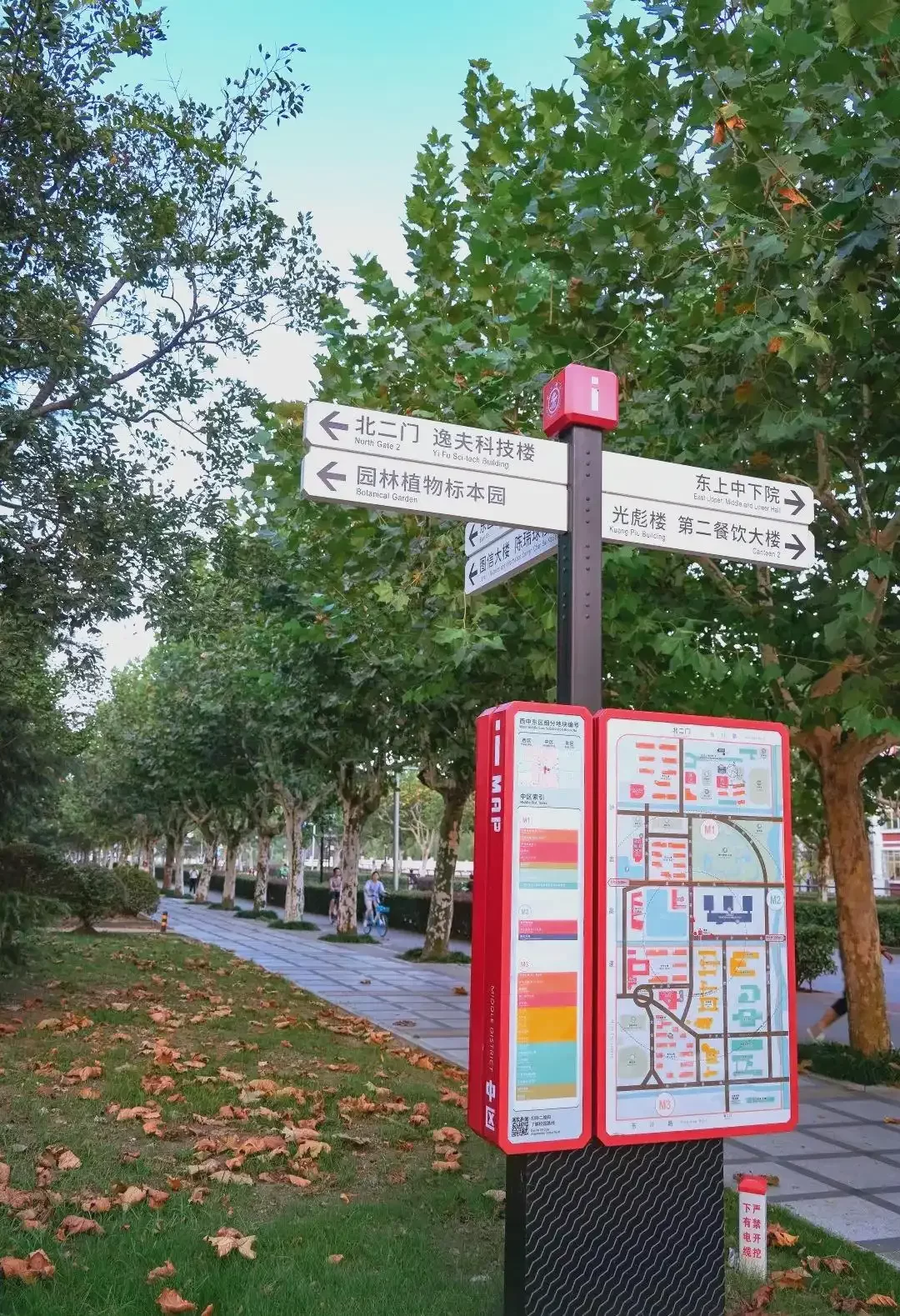
Campus wayfinding signs guide students, faculty, staff, and visitors through the campus, identifying buildings, facilities, parking areas, and points of interest, and providing directional information at decision points (campus entrances, intersections, pathway junctions). Our guide to wayfinding and directory signs covers the design principles behind effective, hierarchy-based navigation systems for large facilities. Campus wayfinding is typically organized in a hierarchical system:
- Primary wayfinding (campus-level): Large directional signs at campus entrances and major intersections, identifying the general direction of major buildings, facilities, and parking areas (e.g., “Administration Building →,” “Student Center ←,” “Parking Lot A ↑,” “Athletic Complex →”). Primary wayfinding signs are typically larger, with bigger text and more destinations, and are positioned for visibility from vehicle and pedestrian traffic.
- Secondary wayfinding (building/area-level): Medium-sized directional signs at building entrances, pathway junctions, and parking lot entrances, identifying specific buildings, facilities, and areas within a campus zone (e.g., “Science Building →,” “Library ←,” “Dining Hall ↑,” “Visitor Parking →”). Secondary wayfinding signs provide more specific, localized direction and are positioned at decision points within a campus area.
- Tertiary wayfinding (building-level): Smaller directional signs near building entrances and within building courtyards, identifying the building name/number, entrance, and nearby facilities (e.g., “Building A – Administration,” “Entrance →,” “Room 101-199 ↑,” “Restrooms ←”). Tertiary wayfinding signs provide the final level of direction before entering a building and help visitors confirm they have arrived at the correct location.
Key design considerations for campus wayfinding:
- Consistent design system: Develop a standardized wayfinding design system (same materials, colors, fonts, layout, iconography, mounting methods) across all wayfinding signs, creating a cohesive, easily recognizable system that users can learn and navigate intuitively. The design system should be based on the institution’s brand identity (colors, fonts, logo) and should be applied consistently across all campus locations.
- Clear, simple typography: Use bold, legible, sans-serif fonts (e.g., Helvetica, Arial, Frutiger, Gotham) for all wayfinding text, avoiding decorative or script fonts that are difficult to read from a distance or at a glance. Use consistent font sizes based on the sign hierarchy (larger text for primary wayfinding, smaller text for tertiary wayfinding). Ensure adequate contrast between text and background (e.g., white text on dark background, dark text on light background) for readability in all lighting conditions.
- Iconography and color-coding: Use consistent icons (e.g., restroom symbol, wheelchair symbol, dining icon, library icon, athletic icon) to help users identify facilities quickly, particularly for users who may not speak the local language or who are navigating quickly. Use color-coding by campus zone, building type, or department to help users navigate large campuses more easily (e.g., blue for academic buildings, green for athletic facilities, orange for student services, red for administration). Ensure color-coding is consistent across all wayfinding signs, maps, and directories.
- Campus maps and directories: Include campus maps and directories at key locations (campus entrances, building lobbies, parking areas, student centers) showing the campus layout, building locations, parking areas, and points of interest, with a “You Are Here” indicator showing the user’s current location. Maps should be simple, clear, and oriented to the user’s viewing direction (the map should match what the user sees when looking at the map). Include a legend explaining the color-coding, icons, and building numbering system.
- Placement at decision points: Position wayfinding signs at all decision points (campus entrances, road intersections, pathway junctions, building entrances, parking lot entrances) where users need to make a navigational decision. Ensure signs are visible from a distance, unobstructed by trees, buildings, or other signs, and positioned at a height that is readable for both pedestrians and vehicle drivers (where applicable).
- Accessibility: Ensure all wayfinding signs are accessible to users with disabilities, including adequate text size and contrast for low-vision users, tactile characters and Braille for permanent room/space identification signs (as required by the ADA), and accessible mounting heights and locations. Our ADA signage guide provides detailed specifications for accessible signage.
Building Identification Signs
Building identification signs identify individual buildings on campus (e.g., “Science Building,” “Library,” “Student Center,” “Building A – Administration”) and are typically mounted on the building facade (near the main entrance) or on a freestanding monument sign near the building entrance. Our guide to building and architectural signage covers design, material, and mounting considerations for facade-mounted identification. Building identification signs are a key element of the campus wayfinding system, helping users confirm they have arrived at the correct building and providing the building name/number for reference in directions and maps.
Key design considerations:
- Consistent with campus design system: Building identification signs should follow the campus-wide signage design system (same materials, colors, fonts, layout), creating a cohesive, professional appearance across the campus. For historic or architecturally significant buildings, the sign design may be adapted to complement the building’s architecture while remaining consistent with the campus design system.
- Building name and number: Include both the building name (e.g., “Science Building”) and building number/letter (e.g., “Building B”) on the identification sign, as campus maps and directions often use building numbers/letters in addition to or instead of names. To standardize numbering across the campus, many institutions use custom wayfinding number signage at building entries and gateways. For buildings named after individuals (e.g., “Smith Hall”), include the building name and, if applicable, a brief dedication or identification (e.g., “John Smith Hall – School of Business”).
- Size and visibility: Size the building identification sign appropriately for the building scale and viewing distance, large enough to be visible from the campus pathway or road but not so large that it overwhelms the building facade. For large buildings or buildings set back from the pathway, a larger sign or a freestanding monument sign near the entrance may be needed for visibility.
- Illumination: Building identification signs may be illuminated for nighttime visibility, particularly for buildings that are used in the evening (libraries, student centers, athletic facilities, residence halls). Use subtle, energy-efficient LED illumination (front-lit, backlit/halo-lit, or external spotlights) that highlights the sign without being obtrusive or creating light pollution. For building-mounted identification, custom front-lit 3D sign letters deliver crisp daytime legibility with energy-efficient LED illumination.
- Material and durability: Use durable, weather-resistant materials (aluminum, stainless steel, acrylic, stone, or a combination) that can withstand outdoor conditions and require minimal maintenance. Ensure the sign is securely mounted to the building facade or freestanding structure, with appropriate hardware and weather sealing.
Parking and Traffic Signs
Parking and traffic signs guide vehicles and pedestrians through campus parking areas, roadways, and pedestrian pathways, ensuring safety, efficiency, and accessibility. Parking and traffic signage includes:
- Parking lot identification: Signs identifying parking lots/garages (e.g., “Parking Lot A,” “Parking Garage – Level 1,” “Visitor Parking,” “Student Parking,” “Faculty/Staff Parking,” “Accessible Parking”).
- Traffic control signs: Regulatory and warning signs for campus roadways, including speed limit signs, stop signs, yield signs, one-way signs, pedestrian crossing signs, and “No Parking” / “Fire Lane” signs. These signs must comply with local traffic regulations and the Manual on Uniform Traffic Control Devices (MUTCD) where applicable.
- Pedestrian pathway signs: Signs guiding pedestrians along campus pathways, identifying accessible routes, crosswalks, and pedestrian-only areas, and warning of potential hazards (e.g., “Watch for Bicycles,” “Slippery When Wet,” “Construction Area”).
- Accessible parking signage: ADA-compliant accessible parking signs, mounted at the required height and location, identifying accessible parking spaces and van-accessible spaces. Our ADA signage guide provides detailed specifications for accessible parking signage.
- Electric vehicle (EV) charging signage: For campuses with EV charging stations, signs identifying EV charging spaces, indicating charging levels (Level 1, Level 2, DC fast charging), and providing usage instructions or payment information.
Key design considerations: Ensure parking and traffic signs comply with all applicable regulations (MUTCD, local traffic codes, ADA accessibility), use standard colors, shapes, and symbols for regulatory and warning signs (for consistency and immediate recognition), and are positioned for visibility from vehicle and pedestrian traffic. Use durable, weather-resistant materials (aluminum, reflective sheeting) that can withstand outdoor conditions and maintain visibility at night (for traffic signs, use retroreflective sheeting meeting ASTM or FHWA standards).
Interior Campus Signage: Building Navigation and Identification
Interior campus signage guides students, faculty, staff, and visitors through individual buildings, identifying rooms, departments, facilities, and services, and providing directional information at decision points (lobbies, corridors, elevator lobbies, stairwells). Interior signage is a critical component of the campus wayfinding system, particularly for large, complex buildings (academic buildings, student centers, libraries, hospitals on campus) where visitors may be unfamiliar with the layout.
Building Directories and Lobby Signs
Building directories (also called floor directories or lobby directories) are typically located in the building lobby or main entrance, listing the building’s floors, departments, offices, rooms, and facilities, with directional information (e.g., “1st Floor: Admissions, Financial Aid, Bookstore; 2nd Floor: Classrooms 201-250, Faculty Offices; 3rd Floor: Science Labs, Dean’s Office”). Building directories help visitors orient themselves within the building and find the specific room or department they are looking for.
Key design considerations:
- Clear, organized layout: Organize the directory by floor (for multi-story buildings) or by department/area (for single-story buildings), with clear headings, room number ranges, and directional arrows. Use a simple, legible font and adequate spacing between entries for readability. Include a building floor plan or map (with a “You Are Here” indicator) in addition to the text directory, helping visitors visualize the building layout and find their destination.
- Digital directories: For modern or high-traffic buildings, digital directory displays (touchscreen or non-interactive LED displays) allow real-time updates (e.g., room changes, event schedules, temporary closures) and can include interactive features (search by department, person, or room number, interactive maps, event calendars). Digital directories are particularly useful for buildings with frequently changing room assignments or event schedules (student centers, conference centers, libraries). Our guide to 2026 LED signage trends provides additional information on digital signage solutions.
- Changeable/modular directories: For buildings with moderately changing room assignments, use changeable or modular directory systems (with slide-in strips or magnetic tiles) that allow room names and numbers to be updated easily without replacing the entire directory. This is more cost-effective and sustainable than reprinting the entire directory every time a room assignment changes.
- Consistent with campus design system: Building directories should follow the campus-wide signage design system (same materials, colors, fonts, layout, iconography), creating a cohesive, professional appearance across all campus buildings. Include the building name/number and institution logo on the directory for brand consistency.
- Accessibility: Ensure directories are accessible to users with disabilities, including adequate text size and contrast for low-vision users, tactile characters and Braille for permanent directories (where required by the ADA), and accessible mounting height and location (for wheelchair users). For digital directories, ensure the display is at an accessible height and includes accessibility features (e.g., screen reader compatibility, high contrast mode, text resizing).
Corridor and Directional Signs
Corridor and directional signs guide people through building corridors, identifying departments, rooms, restrooms, exits, and other facilities, and providing directional information at decision points (corridor intersections, elevator lobbies, stairwell entrances). Corridor directional signs are typically wall-mounted (at eye level) or suspended from the ceiling (for high-traffic corridors or where wall space is limited), and may include text, arrows, and icons.
Key design considerations:
- Placement at decision points: Position corridor directional signs at all decision points (corridor intersections, elevator lobbies, stairwell entrances, building entrances) where users need to make a navigational decision. Ensure signs are visible from a distance, unobstructed by doors, displays, or other signs, and positioned at a consistent height for easy recognition.
- Clear, concise information: Keep corridor directional signs simple and focused, listing only the most important destinations (3–5 per sign) with clear directional arrows. Avoid overcrowding signs with too many destinations, which can make them difficult to read and use. Use consistent icons for common facilities (restrooms, elevators, stairs, exits, accessible routes) to help users identify destinations quickly.
- Floor and wing identification: For large, multi-story, or multi-wing buildings, include floor and wing identification signs (e.g., “2nd Floor – North Wing,” “3rd Floor – Science Wing”) at elevator lobbies, stairwell entrances, and corridor intersections, helping users confirm their current location and navigate to the correct floor/wing.
- Suspended vs. wall-mounted: Choose suspended (ceiling-hung) signs for high-traffic corridors, wide corridors, or areas where wall space is limited, as they are visible from a greater distance and can be seen over crowds. Use wall-mounted signs for narrower corridors, smaller buildings, or where ceiling height is too low for suspended signs. Ensure both types are mounted at the correct height and are accessible (not obstructing accessible routes or protruding into the path of travel).
- Consistent with campus design system: Corridor directional signs should follow the campus-wide signage design system (same materials, colors, fonts, layout, iconography), creating a cohesive, intuitive wayfinding system that users can learn and navigate easily. Use color-coding by floor, wing, or department (consistent with the campus wayfinding color-coding system) to help users navigate large buildings more easily.
Room Identification and Door Signs
Room identification signs identify individual rooms and spaces within campus buildings (classrooms, offices, labs, restrooms, conference rooms, storage rooms, mechanical rooms, lounges, etc.) and are typically mounted on the wall adjacent to the door (latch side, at 48–60 inches height for ADA compliance). For classrooms and offices, custom front-lit acrylic mini letters provide a clean, durable nameplate solution that matches modern interior design. Room identification signs are a critical component of interior wayfinding and are required to be ADA-compliant (with tactile characters and Grade 2 Braille) for all permanent rooms and spaces.
Key design considerations:
- ADA compliance: All permanent room and space identification signs must be ADA-compliant, including tactile characters (raised uppercase sans-serif characters with specific height, stroke width, and proportion), Grade 2 Braille (positioned directly below the corresponding tactile characters), minimum 70% contrast between characters and background, non-glare (matte) finish, and mounting at 48–60 inches to the baseline of the lowest tactile character on the latch side of the door. Our ADA signage guide provides detailed specifications for ADA-compliant room identification signs.
- Room number and name: Include both the room number (e.g., “Room 101”) and room name/function (e.g., “Classroom,” “Faculty Office,” “Chemistry Lab,” “Restroom”) on the identification sign, as users may reference either number or name. For offices, include the occupant’s name and title (e.g., “Dr. Sarah Chen, Professor of Biology”) if desired, but note that occupant names may change frequently—consider using changeable insert signs or modular systems for offices with high turnover.
- Consistent with campus design system: Room identification signs should follow the campus-wide signage design system (same materials, colors, fonts, layout, mounting methods), creating a cohesive, professional appearance across all campus buildings. For historic or architecturally significant buildings, the sign design may be adapted to complement the building’s architecture while remaining ADA-compliant and consistent with the campus design system.
- Material and durability: Use durable, easy-to-clean materials for room identification signs, particularly for high-traffic areas (classrooms, restrooms, corridors) where signs may be touched frequently or exposed to cleaning chemicals. Common materials include acrylic, phenolic (micarta), aluminum (with powder coating), and stainless steel. Ensure tactile characters and Braille are securely attached and durable (not prone to peeling or breaking).
- Changeable/modular systems: For rooms with frequently changing occupants or functions (faculty offices, temporary classrooms, event spaces), use changeable insert signs or modular sign systems that allow room names, occupant names, or functions to be updated easily without replacing the entire sign. This is more cost-effective and sustainable than replacing entire signs every time a room assignment changes.
Restroom and Accessibility Signs
Restroom and accessibility signs identify men’s, women’s, unisex/all-gender, and family/accessible restrooms, and identify accessible features and routes (accessible entrances, elevators, ramps, accessible parking, accessible water fountains). Restroom signs must be ADA-compliant (with tactile characters, Grade 2 Braille, and the International Symbol of Accessibility for accessible restrooms) and are typically mounted on the latch side of the door at 48–60 inches height. Our ADA signage guide provides detailed specifications for restroom and accessibility signage.
Safety, Emergency, and Regulatory Signage
Safety, emergency, and regulatory signage is critical in educational institutions, ensuring the safety of students, faculty, staff, and visitors, and complying with federal, state, and local regulations (OSHA, NFPA, building codes, fire codes, ADA). Safety and emergency signage includes several types:
Exit Signs and Emergency Lighting
Exit signs identify emergency exits and egress routes, and emergency lighting provides illumination along egress paths during power outages. Exit signs and emergency lighting must comply with NFPA 101 (Life Safety Code), the International Building Code (IBC), and local fire codes, and must be UL 924 listed (for illuminated exit signs). Our guide to exit signs and emergency signage provides detailed requirements for exit signs and emergency lighting, while our guide to LED sign certification explains UL 924 and other compliance requirements for illuminated campus signage.
Fire Safety and Evacuation Signs
Fire safety and evacuation signs include fire extinguisher location signs, fire alarm pull station signs, fire hose cabinet signs, evacuation route maps (posted in visible locations in each building/floor), assembly point signs (identifying outdoor assembly areas for evacuations), and “You Are Here” evacuation maps showing the user’s current location and the nearest evacuation route. These signs must comply with NFPA, OSHA, and local fire code requirements, and must be clearly visible and unobstructed.
Hazard and Safety Warning Signs
Hazard and safety warning signs identify potential hazards in campus buildings and facilities, including chemical storage areas (in science labs, art studios, maintenance shops), high-voltage electrical rooms, mechanical rooms, construction areas, wet floors, low headroom, tripping hazards, and biological hazards (in labs and healthcare facilities). These signs must comply with OSHA hazard communication standards (using standard signal words: “Danger,” “Warning,” “Caution,” “Notice”) and use standard colors and symbols for immediate recognition.
Security and Access Control Signs
Security and access control signs identify restricted areas (e.g., “Authorized Personnel Only,” “Staff Only,” “No Admittance”), identify security measures (e.g., “24-Hour Video Surveillance,” “Alarm System,” “Lockout Procedure”), and provide emergency contact information (e.g., “Campus Security: Ext. 1234,” “Emergency: 911”). These signs help maintain campus security and ensure that users are aware of access restrictions and security procedures.
Regulatory and Compliance Signs
Regulatory and compliance signs include signs required by federal, state, or local regulations, including OSHA workplace safety posters (required in all workplaces), labor law posters (minimum wage, anti-discrimination, workers’ compensation), Title IX and non-discrimination notices (required in educational institutions), Clery Act crime statistics notices (required for colleges and universities), FERPA privacy notices, and state-specific education regulations. These signs must be displayed in visible, accessible locations (e.g., near building entrances, in administrative offices, in employee break rooms) and must be kept up to date with current regulations.
Digital and Interactive Campus Signage
Digital and interactive signage is increasingly used in educational institutions to provide real-time information, enhance wayfinding, promote campus events, and engage students, faculty, staff, and visitors. Digital signage applications in education include:
- Digital directories and wayfinding: Touchscreen or non-interactive digital displays in building lobbies, student centers, and high-traffic areas, providing interactive campus maps, building directories, event schedules, and real-time information (room changes, event cancellations, emergency alerts). Digital directories can be updated in real time and can include search functionality (search by person, department, room, or event).
- Event and announcement displays: Digital displays in high-traffic areas (student centers, libraries, dining halls, building lobbies, outdoor common areas) promoting campus events, announcements, deadlines, club activities, athletic schedules, and important dates. Digital displays allow real-time updates and can display dynamic content (slideshows, videos, social media feeds) that is more engaging than static signage.
- Emergency alert displays: Digital signage systems can be integrated with campus emergency alert systems to display emergency alerts (active shooter, weather emergency, evacuation orders) across all digital displays on campus, providing critical information to students, faculty, staff, and visitors in real time. Emergency alert integration is a valuable safety feature for educational institutions and is increasingly required by campus safety plans.
- Digital menu boards: For campus dining halls, cafes, and food courts, digital menu boards display menus, prices, nutritional information, and daily specials, with real-time updates for menu changes and pricing. Our guide to menu board signs and LED menu displays provides detailed information on digital menu board solutions.
- Classroom and lecture hall displays: Digital displays outside classrooms and lecture halls showing the current class, instructor, next class, and room schedule, helping students and faculty confirm they are in the correct room and providing real-time schedule updates. These displays can be integrated with the campus scheduling system for automatic updates.
- Athletic facility displays: Digital scoreboards, video displays, and promotional displays in athletic facilities (stadiums, arenas, gyms, pools) showing game scores, statistics, replays, promotions, and advertisements. Athletic facility digital signage enhances the fan experience and provides revenue opportunities through sponsorships and advertising.
Key considerations for digital campus signage: Develop a digital signage content management strategy (who creates content, how often it is updated, content approval process) to ensure displays remain current and engaging. Use a centralized content management system (CMS) to manage all digital displays across campus, allowing centralized control and consistent branding. Ensure digital displays are accessible (adequate text size and contrast, screen reader compatibility, accessible mounting height) and integrated with campus emergency alert systems for safety. Plan for ongoing maintenance, software updates, and hardware replacement (digital displays have a typical lifespan of 5–10 years, shorter than static signage).
Athletic and Recreational Facility Signage
Athletic and recreational facilities (stadiums, arenas, gymnasiums, pools, fitness centers, fields, courts) require specialized signage for identification, wayfinding, safety, and fan experience. Athletic facility signage includes:
- Facility identification signs: Signs identifying athletic facilities (e.g., “Smith Stadium,” “Student Recreation Center,” “Aquatic Center,” “Tennis Courts”) and entrances (e.g., “Main Entrance,” “Ticket Office,” “Athlete Entrance,” “VIP Entrance”).
- Wayfinding and directional signs: Signs guiding spectators, athletes, and staff through athletic facilities, identifying seating sections, restrooms, concessions, ticket offices, merchandise stands, locker rooms, training rooms, press boxes, and accessible seating areas. Use color-coding and section numbering to help spectators find their seats quickly.
- Scoreboards and video displays: Digital scoreboards, video displays, and timing systems in stadiums, arenas, gyms, and pools, showing game scores, statistics, timing, replays, promotions, and advertisements. Scoreboards and video displays enhance the fan experience and provide revenue opportunities through sponsorships and advertising.
- Safety and regulatory signs: Signs identifying potential hazards in athletic facilities (e.g., “No Diving – Shallow Water,” “Wet Floor,” “High Voltage,” “Authorized Personnel Only”), safety rules (e.g., “No Running on Pool Deck,” “Proper Attire Required,” “No Food or Drink Beyond This Point”), and emergency equipment locations (first aid stations, AEDs, emergency exits, fire extinguishers).
- Sponsorship and advertising signage: Signs displaying sponsor logos, advertisements, and donor recognition in athletic facilities (e.g., “Presented by [Sponsor Name],” “Gold Level Sponsor: [Company Name],” “Donated by [Donor Name]”). Sponsorship and advertising signage provides revenue for athletic programs and recognizes donors and sponsors.
- Donor and recognition signage: Signs recognizing donors, contributors, and distinguished alumni in athletic facilities (e.g., donor walls, hall of fame displays, named facilities, championship banners). Donor and recognition signage acknowledges contributions and inspires future giving.
Designing a Cohesive Campus Sign System
A successful campus sign system is cohesive, consistent, and comprehensive, addressing the wayfinding and identification needs of all campus users while reflecting the institution’s brand identity and complying with all applicable regulations. The following best practices will help you design an effective campus sign system:
1. Develop a Campus Signage Master Plan
Before purchasing or installing any signs, develop a comprehensive campus signage master plan that identifies all sign types, locations, and specifications needed across the entire campus. The master plan should include:
- Exterior signage: campus entrance/monument signs, building identification signs, wayfinding/directional signs, parking/traffic signs, athletic facility signs
- Interior signage: building directories, corridor/directional signs, room identification signs, restroom/accessibility signs, safety/emergency signs, regulatory signs
- Digital signage: digital directories, event/announcement displays, emergency alert displays, digital menu boards, classroom displays, athletic facility displays
- Signage design system: materials, colors, fonts, layouts, iconography, mounting methods, illumination standards
- Sign hierarchy: primary (campus-level), secondary (building/area-level), tertiary (room-level) signage standards
- Regulatory compliance: ADA accessibility, NFPA/OSHA safety, building/fire codes, local sign codes, education-specific regulations (Title IX, Clery Act, FERPA)
- Maintenance and update plan: sign maintenance schedule, replacement plan, digital signage content management strategy, budget for ongoing maintenance and updates
The master plan should be reviewed and approved by campus administration, facilities management, campus safety, and (for public institutions) relevant government agencies, and should be updated periodically as the campus grows and evolves.
2. Establish a Consistent Signage Design System
Develop a standardized signage design system (also called a signage standards manual or sign guidelines) that defines the materials, colors, fonts, layouts, iconography, mounting methods, and illumination standards for all campus signage. The design system should be based on the institution’s brand identity (colors, fonts, logo, design style) and should be applied consistently across all campus locations and sign types. A consistent design system creates a cohesive, professional appearance, helps users learn and navigate the wayfinding system intuitively, and simplifies sign procurement and maintenance by standardizing sign types and specifications.
3. Prioritize Wayfinding and User Experience
The primary goal of campus signage is to help users navigate the campus easily and efficiently, so prioritize wayfinding and user experience in all design decisions:
- Understand user needs: Conduct a wayfinding audit or user research to understand the navigation needs of different user groups (new students, prospective students/visitors, faculty, staff, parents, delivery personnel, emergency responders) and identify common pain points and confusion areas. Use this research to inform the signage master plan and design system.
- Use a clear hierarchy: Organize signage in a clear hierarchy (primary campus-level, secondary building/area-level, tertiary room-level) with consistent design standards for each level (larger text and more destinations for primary signs, smaller text and more specific information for tertiary signs). A clear hierarchy helps users understand the level of information they are viewing and navigate from general to specific.
- Place signs at decision points: Position wayfinding signs at all decision points (campus entrances, road intersections, pathway junctions, building entrances, corridor intersections, elevator lobbies, stairwell entrances) where users need to make a navigational decision. Ensure signs are visible from a distance, unobstructed, and positioned at a consistent height for easy recognition.
- Use maps and “You Are Here” indicators: Include campus maps and building floor plans at key locations (campus entrances, building lobbies, parking areas, student centers) with “You Are Here” indicators showing the user’s current location. Maps should be simple, clear, and oriented to the user’s viewing direction (the map should match what the user sees when looking at the map).
- Use color-coding and iconography: Use consistent color-coding (by campus zone, building type, department, or floor) and iconography (for common facilities and destinations) to help users navigate the campus more easily and identify destinations quickly. Ensure color-coding and iconography are consistent across all signage, maps, and directories, and include a legend explaining the system.
- Keep information simple and concise: Keep wayfinding signs simple and focused, listing only the most important destinations (3–5 per sign) with clear directional arrows. Avoid overcrowding signs with too much information, which can make them difficult to read and use. Use clear, simple language and avoid jargon or abbreviations that users may not understand.
4. Ensure Regulatory Compliance and Accessibility
Campus signage is subject to a wide range of federal, state, and local regulations, and non-compliance can result in fines, legal liability, and safety hazards. Ensure all signage complies with applicable regulations, including:
- ADA accessibility: All permanent room/space identification signs must be ADA-compliant (tactile characters, Grade 2 Braille, 70% contrast, non-glare finish, mounting at 48–60 inches on the latch side of the door). All wayfinding and informational signs should be accessible (adequate text size and contrast for low-vision users, accessible mounting height and location). Our ADA signage guide provides detailed specifications.
- NFPA and building/fire codes: Exit signs, emergency lighting, fire safety signs, and evacuation maps must comply with NFPA 101 (Life Safety Code), the International Building Code (IBC), and local fire codes. Our exit signs guide provides detailed requirements.
- OSHA workplace safety: Hazard warning signs, safety posters, and workplace safety signage must comply with OSHA standards (using standard signal words, colors, and symbols).
- Local sign codes and zoning: Exterior signage (campus entrance signs, building identification signs, wayfinding signs, digital displays) must comply with local sign codes and zoning regulations (size, height, setback, illumination, number of signs). Always obtain the necessary sign permits before installation. Our guide to outdoor sign permits and zoning provides detailed information on the permit process.
- Education-specific regulations: Educational institutions are subject to specific federal and state regulations, including Title IX (non-discrimination), Clery Act (crime statistics and campus safety), FERPA (student privacy), and state education regulations. Ensure required notices and signage are displayed in visible, accessible locations and kept up to date.
5. Choose Durable, Low-Maintenance Materials
Campus signage is a long-term investment (expected to last 10–30+ years, depending on sign type and location) and should be constructed from durable, low-maintenance materials that can withstand the campus environment (high traffic, outdoor weather, frequent cleaning, potential vandalism). Recommended materials for campus signage include:
- Exterior signage: Natural stone (granite, limestone), brick, precast concrete, stainless steel (304/316), aluminum (with powder coating), acrylic (UV-stabilized), and high-pressure laminate (HPL) for wayfinding signs. These materials are durable, weather-resistant, and require minimal maintenance (periodic cleaning with mild detergent).
- Interior signage: Acrylic, phenolic (micarta), aluminum (with powder coating), stainless steel, high-pressure laminate (HPL), and tempered glass (for digital display surrounds). These materials are durable, easy to clean, and suitable for high-traffic interior environments.
- Room identification signs: Acrylic, phenolic, and aluminum are the most common materials for ADA-compliant room identification signs, as they can be easily fabricated with tactile characters and Braille and are durable and easy to clean.
- Digital displays: Commercial-grade LED displays and touchscreens with durable enclosures (aluminum or steel with tamper-resistant hardware) for high-traffic public areas. Ensure digital displays are rated for the installation environment (indoor vs. outdoor, high-brightness for sunny locations) and include cooling and surge protection for reliable operation.
Avoid cheap, low-quality materials (thin plastic, non-UV-stabilized vinyl, low-grade paint) that will fade, crack, peel, or deteriorate quickly, requiring frequent replacement and creating an unprofessional appearance. Investing in high-quality, durable materials upfront will save money over the long term through reduced maintenance and replacement costs.
6. Plan for Maintenance, Updates, and Future Growth
A campus sign system is not a one-time investment—it requires ongoing maintenance, updates, and adaptation as the campus grows and evolves. Plan for maintenance and updates from the beginning:
- Maintenance schedule: Develop a regular maintenance schedule for all campus signage, including visual inspections (checking for damage, fading, loose mounting, burned-out illumination), cleaning (exterior signs, interior signs, digital displays), and repairs (replacing damaged signs, repairing illumination, updating outdated information). Assign responsibility for sign maintenance to the facilities department or a dedicated signage coordinator.
- Update plan: Develop a process for updating signage when room assignments change, new buildings are constructed, departments are renamed, or campus maps change. Use changeable/modular sign systems (slide-in strips, magnetic tiles, digital displays) for frequently changing information to make updates easy and cost-effective. Maintain a sign inventory (with sign locations, types, materials, installation dates, and maintenance records) to track signage across the campus and plan for replacements.
- Budget for ongoing costs: Include ongoing maintenance, repair, and replacement costs in the campus facilities budget, not just the initial signage installation cost. Plan for periodic signage upgrades (e.g., every 10–15 years for exterior signs, every 5–10 years for digital displays) to keep the campus signage current and in good condition.
- Plan for future growth: Design the campus sign system to accommodate future growth (new buildings, expanded facilities, additional parking, new programs) by using a flexible, scalable design system that can be extended to new locations without redesigning the entire system. Include spare capacity in directories and wayfinding signs (blank slots for future additions) and use standardized sign types and specifications that can be replicated for new buildings and locations.
Hongbo Sign Education and Campus Signage Solutions
At Hongbo Sign, we design and manufacture comprehensive education signage solutions for schools, universities, colleges, and institutional facilities. With over a decade of experience in commercial signage manufacturing and a deep understanding of the unique requirements of educational institutions (wayfinding complexity, regulatory compliance, durability, brand consistency), we deliver high-quality, durable, cohesive signage systems that serve campus communities effectively and stand the test of time.
- Comprehensive product range: We manufacture every type of education and campus signage, including campus entrance/monument signs (with integrated digital LED displays), building identification signs, exterior wayfinding and directional signs, parking and traffic signs, athletic facility signs, building directories (printed, changeable, and digital), corridor and directional signs, room identification and door signs (ADA-compliant tactile/Braille), restroom and accessibility signs, safety and emergency signs (exit signs, fire safety, hazard warnings), regulatory and compliance signs (OSHA, Title IX, Clery Act), digital directories and interactive displays, digital menu boards (for dining facilities), classroom and lecture hall displays, and donor/recognition signage (donor walls, hall of fame displays, named facility signs).
- Campus signage master planning and design: We offer comprehensive campus signage master planning and design services, working with campus administration, facilities management, and design teams to develop a cohesive, comprehensive signage program tailored to the institution’s specific needs, campus layout, brand identity, and budget. Our design team can develop a standardized signage design system (materials, colors, fonts, layouts, iconography, mounting methods) that reflects the institution’s brand identity and can be applied consistently across all campus locations. We provide digital proofs, 3D renderings, and site-specific mockups for review and approval before fabrication.
- ADA compliance expertise: We specialize in ADA-compliant tactile and Braille signage for educational institutions, including room identification signs, restroom signs, and permanent space identification signs, meeting all applicable ADA Standards for Accessible Design (tactile character specifications, Grade 2 Braille, mounting height/location, contrast, non-glare finish). Our ADA signage guide provides detailed specifications, and we can help you ensure your entire campus signage program is fully ADA-compliant.
- Digital signage and interactive solutions: We offer digital signage solutions for educational institutions, including digital directories and interactive wayfinding displays, event/announcement displays, emergency alert-integrated displays, digital menu boards (for dining facilities), classroom/lecture hall schedule displays, and athletic facility scoreboards/video displays. We provide user-friendly content management software with centralized control for multi-building/multi-location campuses, and we can integrate digital signage with campus scheduling systems, emergency alert systems, and other campus technology platforms. Our guide to 2026 LED signage trends provides additional information on digital signage solutions.
- Durable, low-maintenance construction: All our campus signage is designed for durability and low maintenance in the high-traffic, high-wear educational environment, using commercial-grade, weather-resistant materials (natural stone, brick, precast concrete, stainless steel, powder-coated aluminum, UV-stabilized acrylic, high-pressure laminate, phenolic) and high-quality fabrication techniques. We design signs with easy access for maintenance and updates, with modular, replaceable components (LED modules, power supplies, graphics, changeable inserts) to minimize downtime and repair costs. Our guide to LED sign maintenance provides detailed cleaning and maintenance recommendations.
- Regulatory compliance support: We provide all documentation and certifications needed for regulatory compliance, including UL listing for illuminated signs and digital displays, ADA-compliant tactile/Braille signage, NFPA-compliant exit signs and emergency lighting, OSHA-compliant safety signage, and sign drawings/specifications for permit applications. We stay current with federal, state, and local regulations affecting educational signage (ADA, NFPA, OSHA, local sign codes, Title IX, Clery Act, FERPA) and can advise on compliance requirements.
- Multi-building and multi-campus rollout capability: Whether you need signage for a single school building or a multi-building university campus (or a multi-campus school district/university system), we have the production capacity and project management systems to deliver consistent, high-quality signage across all locations. We offer centralized project management, coordinated production and shipping schedules, brand consistency controls, standardized signage design systems, and bulk pricing for large orders. We can also create a campus signage standards manual for your institution, ensuring consistent branding and signage across all current and future buildings and campuses.
- Installation support and project management: We provide comprehensive installation instructions, mounting templates, wiring diagrams, and technical support for your local installation team. For complex campus signage projects (large monument signs, digital display networks, multi-building rollouts), we can provide remote project management and technical support to coordinate installation across multiple buildings and ensure proper installation and electrical connection. We can also work with your facilities team or designated signage installer to ensure a smooth, efficient installation process.
- Competitive factory-direct pricing: As a direct manufacturer, we offer competitive factory-direct pricing with no middleman markup. We provide transparent, itemized quotations with no hidden fees, and we can work with you to find cost-effective solutions that meet your budget without compromising quality, durability, or regulatory compliance. We offer volume discounts for large orders and multi-building/multi-campus rollouts, and we can phase the signage implementation to align with your budget and construction schedule.
We understand that campus signage is a critical investment in the student experience, campus safety, and institutional identity, and we are committed to delivering high-quality, durable, cohesive signage that serves your campus community effectively for years to come. From initial signage master planning and design to fabrication, quality control, shipping, and after-sales support, we are with you every step of the way.
Ready to plan or upgrade your campus signage program? Contact us today for a free consultation and factory-direct quote. Our team will work with you to design a comprehensive, cohesive, compliant signage system that meets your institution’s specific needs and budget.